* * HELP & MANUAL PREMIUM PACK 4 DEMO VERSION * *
This documentation was styled with a demo skin from the Premium Pack 4 add-on for Help & Manual. The contents of the skin are encrypted and not configurable. You can only publish HM projects with this skin. You cannot edit it or change it.
This version is copyright and may only be used for local testing purposes. It may not be distributed.
Please purchase the full version of the Premium Pack to get the configurable skins and remove this notice. The package will also include the Toolbox configuration utility for Premium Pack skins.
Commenting the code
Comments are regions of text that thinBasic interpreter will ignore but may contain information that is useful to the programmer.
Commenting source code is a good practice for every programmer. Comments serve as a sort of in-code documentation.
For this reasons thinBasic has implemented different ways in which programmer can add comments into thinBasic scripts:

•classic Basic REM keyword
•single quote '
•special single quote cases
•c style block comments
•c++ style comment
REM keyword
REM keyword is the most known and classic Basic way to add comment. For example
REM ------------------------------------------------
REM This is the start of the main program
REM ------------------------------------------------
Single quotation mark (')
Single quotation mark (') is another classical Basic way to add remarks. Example:
'------------------------------------------------
' This is the start of the main program
'------------------------------------------------
It it a more flexible way because it allows to add remarks on a line following another statement. For example
DIM Msg AS STRING '---This variable will be used ...
C Like remarks
thinBasic allows usage of C-Like comments using /* ... */ pairs. They can be used as a block or can be used on a line following another statement. Examples:
/*
------------------------------------------------
This is the start of the main program
------------------------------------------------
*/
DIM Msg AS STRING /* This variable will be used ... */
C++ Like remarks
thinBasic allows usage of C++ single line comment using //
Examples:
// This is the start of the main program
DIM Msg AS STRING // This variable will be used
Special single quotation mark (') remarks
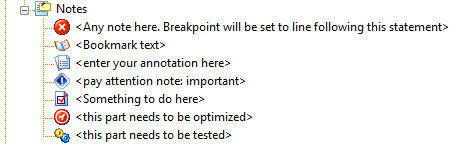
There are special single quotation mark (') remarks followed by [] that are interpreted by thinAir (thinBasic IDE) and thinDebug (thinBasic debugger) in a special way and they can be used to classify remarks in different types.
For example, using special single quotation mark like the following:
'[] <enter your annotation here>
'[!] <pay attention note: important>
'[o] <this part needs to be optimized>
'[t] <this part needs to be tested>
'[todo] <Something to do here>
'[breakpoint] <Any note here. Breakpoint will be set to line following this statement>
will be interpreted and identified by the thinAir in the following way permitting a very flexible way to keep your code organized:
Finally another special single line quotation mark is the following:
'[book] <Bookmark text>
It allows to add code bookmarks for quick jump using F2 or Shift+F2 keyboard shortcuts.
