* * HELP & MANUAL PREMIUM PACK 4 DEMO VERSION * *
This documentation was styled with a demo skin from the Premium Pack 4 add-on for Help & Manual. The contents of the skin are encrypted and not configurable. You can only publish HM projects with this skin. You cannot edit it or change it.
This version is copyright and may only be used for local testing purposes. It may not be distributed.
Please purchase the full version of the Premium Pack to get the configurable skins and remove this notice. The package will also include the Toolbox configuration utility for Premium Pack skins.
How to use thinBasic as a CGI script engine under IIS web server.
Internet Information Server (IIS) Web Server
•Be sure IIS is installed in your system
•Go to: Control Panel / Administrative Tools
•Run "Internet Information Services"
•Open your "Default Web Site"
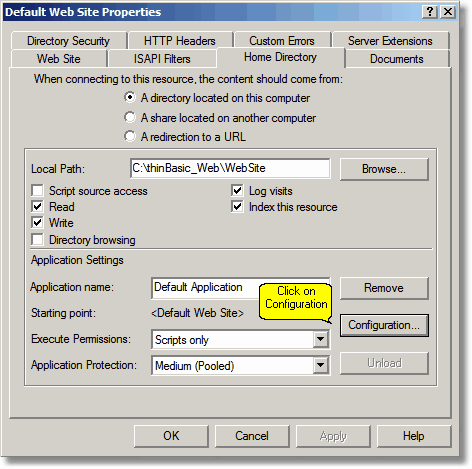
•Right click on "Default Web Site" and select "Properties"
•Select "Home Directory" tab
•Under "Application Settings" click on "Condifuration..." button
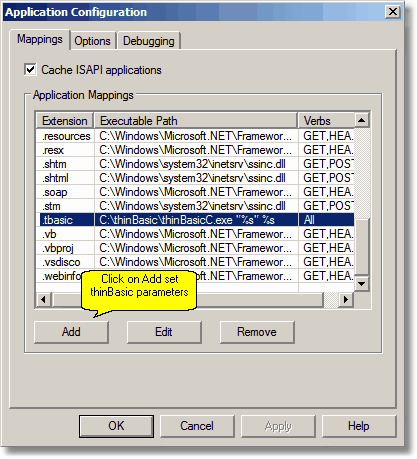
•Under "Mappings" tab click on "Add" button
•Add the following information:
•Executable: C:\thinBasic\thinBasicC.exe "%s" %s
•Extension .tBasic
•Verbs: All Verbs
•Script Engine: Yes
•Check that file exists: Yes
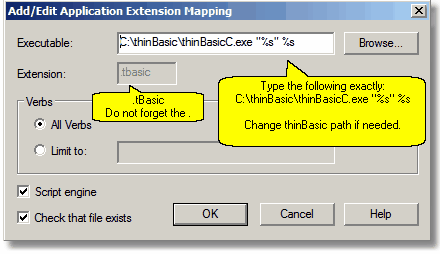
•Confirm with "OK"
•Add another extension mapping for .tBasiC extension (Console specific extension):
•Executable: C:\thinBasic\thinBasicC.exe "%s" %s
•Extension .tBasicC
•Verbs: All Verbs
•Script Engine: Yes
•Check that file exists: Yes
•Confirm with "OK" all the dialogs
